
This review of Clip Studio Paint explores whether CSP can be better than Photoshop for illustration, concept art, comics and manga, at a much lower cost
Have you ever wished you could find a drawing program as powerful as Photoshop but without having to pay the recurring monthly subscription fee? Clip Studio Paint may be the alternative you are looking for. If you want to know whether Clip Studio Paint Pro or Ex is worth it for illustrators, concept artists, drawing comics, manga or animation, keep reading.
Here we are going to review Clip Studio Paint (Pro or EX) exploring what are its pros and cons and whether it can be a viable alternative to Photoshop for illustration, concept art, comics, manga and the like.
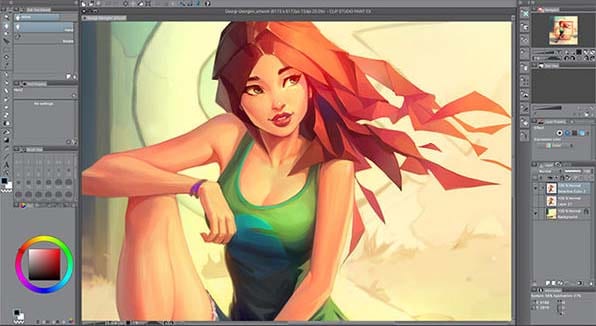
Clip Studio Paint, originally called Manga Studio 5, is a photo editing software that has features for digital painting, illustration and specially creating manga and comics.
With this software you can do comics, manga, illustration, environments, digital portraits, as well as graphic design and photo retouching. Here you can see examples of illustrations and comics you can do with Clip Studio Paint.
These are some of the key features of Clip Studio Paint:
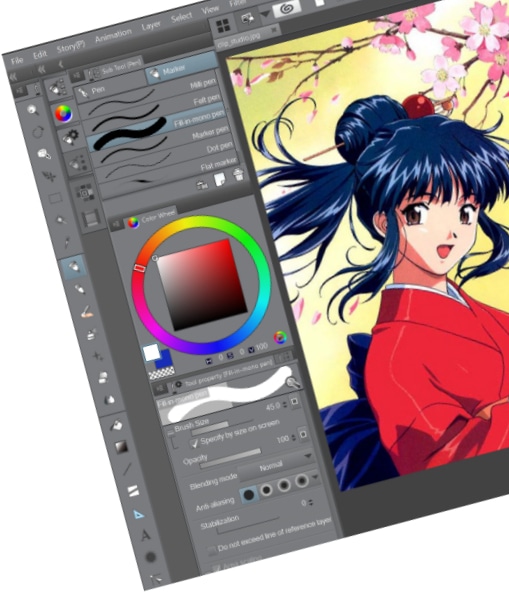
Basically, Clip Studio Paint comes in two versions to choose from: Pro and Ex.
- Clip Studio Paint Pro is for illustration, concept art, character art, etc.
- Clip Studio Paint Ex is designed for manga, animation and comics.
This doesn't mean that you can't use the Pro version for manga and comics, it just means that the "Ex" version provides additional features like multi-page support, animation support, etc.
As you probably already know, Photoshop is the standard for professional digital photo editing and it is an incredibly powerful tool. However in spite of its power Photoshop does have its own drawbacks, the main one being the cost, as Photoshop is a subscription based software so you have to pay a montly fee to use Photoshop. Another disadvantage of Photoshop is the steep learning curve.
Clip Studio, on the other hand, is much cheaper (single payment and lifetime access, see prices below) and it is also more intuitive and easier to learn.
So, which one should you choose?
Here we have compiled a comparison of the main features of Clip Studio Paint versus Photoshop.
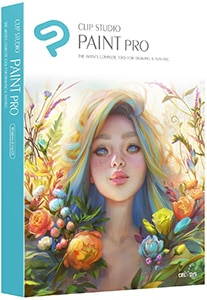 Clip Studio Paint |  Photoshop | |
|---|---|---|
Payment | Single payment | Monthly subscription |
Custom brushes | Yes | Yes |
Watercolor, oil, pencil brushes | Yes | Yes |
Gradient maps | Yes | Yes |
Layer blending modes | Yes | Yes |
Layer masks | Yes | Yes |
Filters | Yes | Yes |
Pen pressure and tilt support | Yes | Yes |
Vector drawing | Yes | Yes |
Non-destructive adjustment layers | Yes | Yes |
Perspective rulers | Yes | Yes |
Customizable workspace | Yes | Yes |
Built-in library of materials and assets | Yes | No |
Customizable 3D references | Yes | No |
Works on Android tablets and smartphones | Yes | No |
Colour jitter and randomization | No | Yes |
Advanced filtering and post-processing | No | Yes |
Download link |
One important point to note is that Clip Studio Paint can open Photoshop files, while Photoshop cannot open Clip Studio Paint files.
Clip Studio Paint has slightly better blending engine so mixing and blending paint on screen feels more natural, plus the adjustable stabilization feature on brushes keeps lines smooth and natural when doing quick brushstrokes.
Photoshop tends to be better for post-procesing and doing very complex filtering. Also the brushes can be customized to an insane degree in Photoshop, with things like colour jitter and randomization which Clip Studio doesn't have.
Clip Studio Paint goes on sale a few times per year, and the sale usually lasts one week. That's the ideal time to buy Clip Studio Paint at a significantly discounted price.
We will notify you when Clip Studio Paint goes on sale.
When the button below goes ACTIVE, it will mean that Clip Studio Paint is on sale that week.
The sale will be on for one week, and we don't know when it will be on sale again.
Now you can get Clip Studio Paint at a discount up to -40% off its official price, clicking the button below.
Clip Studio Paint comes with some cool features that make it stand out from other software packages. Here are some of them:
Overall Clip Studio Paint, in either of its versions (Pro or Ex) is an incredibly well rounded piece of software for artists. It is extremely powerful and versatile.
One possible improvement would be the addition of extra advanced filters for image post-processing, as well as colour jitter and randomization for the brush tips.
How much does Clip Studio Paint cost
How to get Clip Studio Paint
If you decide to purchase Clip Studio Paint, all you have to do is choose your version (Pro or EX) from the options below, and this will take you to the download page.
Learning how to use Clip Studio Paint
While there are tons of tutorials out there, the huge amount of information can be so overwhelming that it is easy to not know where to start.
Therefore, the quickest and most effective way to learn Clip Studio Paint without getting stuck is by taking an online course. These are usually cheap, hands-on and fun to go through. After taking one of these courses, you will feel so much more confident and you will be able to use Clip Studio Paint effortlessly.
This is the best Clip Studio Paint course I have found, as it teaches everything you need from beginner to advanced:

Now, if you are serious about learning digital painting, drawing fundamentals or anime, these courses are for you:
- Best course to learn character design --> Character Art School: Complete Character Drawing Course

- Best course to learn how to draw --> The Ultimate Drawing Course - Beginner to Advanced

- Best course to learn how to draw Anime and Manga --> Anime Academy: Characters and Illustrations

- Best course to learn Digital Painting --> The Ultimate Digital Painting Course - Beginner to Advanced

If you are deciding whether you should purchase Photoshop or Clip Studio Paint, then you should ultimately think about what your goals are:
- Get Clip Studio Paint is for you if:
Grab Photoshop instead if:
Wrapping up, is Clip Studio Paint the best drawing software out there?
It depends on your needs, but it is safe to say that Clip Studio Paint is one of the top software packages for illustration, concept art and character design. When it comes to animation, comics and manga, few other programs can compete with Clip Studio Paint Pro or Ex.
If you are ready to go a step further and improve the quality of your illustrations and comics, try Clip Studio Paint and judge for yourself, and don't forget to leave a comment telling us your experience with Clip Studio Paint.
What are the best Pen Display graphic tablets of this year?
Best tablet computer for design?

 (14 votos, promedio: 4.64 de 5)
 Loading...